Colors & Shapes: Coloring game
- 4.5
- Rating
- 10.00M
- Installs
- Free
- Price
 Analysis by App-foxy
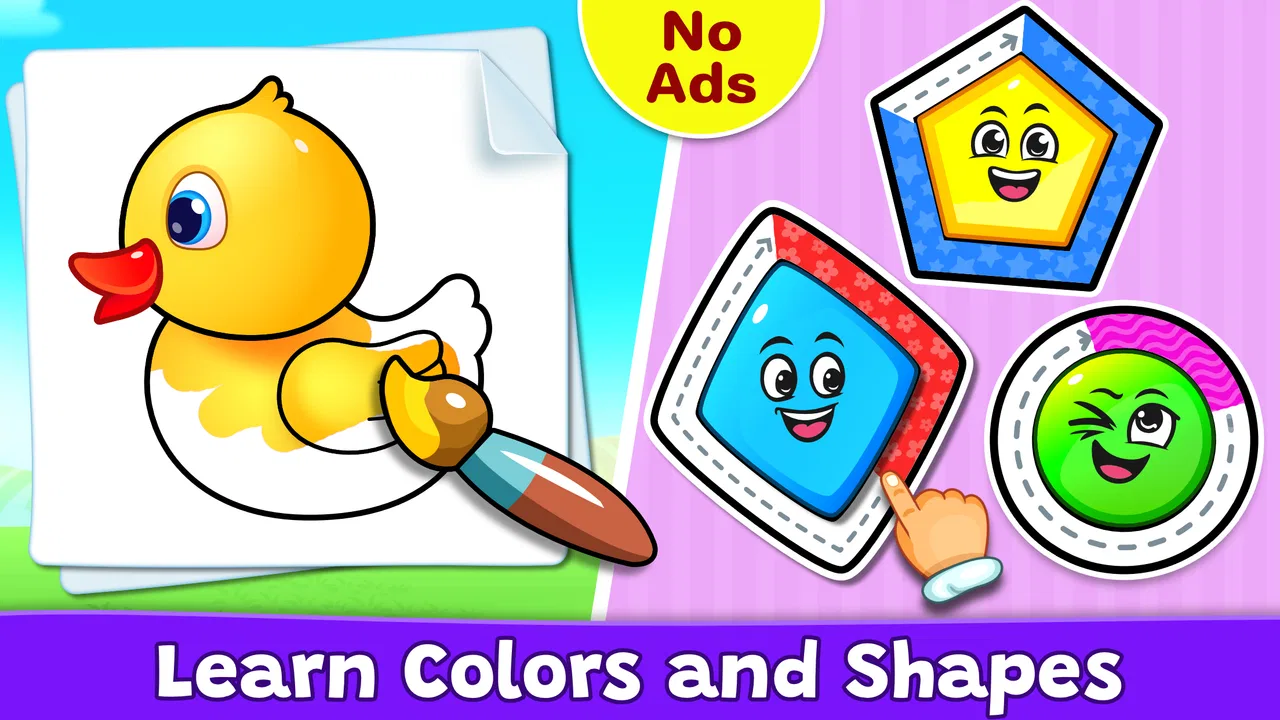
I noticed the appeal of Colors & Shapes: Coloring game almost immediately: it asks a child to do something familiar, then turns that simple action into a small learning moment. Instead of presenting coloring as a blank activity with no direction, this educational game connects colors and shapes with playful tasks that are easy to understand. I found it especially suitable for younger children who are still building confidence with basic visual recognition and touch controls.
The game is made by RV AppStudios and is available free of charge. It is aimed at everyone, although its design is clearly most useful for preschool and early-learning players. The app has been around since September 2017, supports devices running Android 6.0 or later, and has reached more than ten million installs. Its average score is 4.5 from roughly twenty-one thousand ratings, which matches my impression that it fills a familiar need effectively: short, approachable practice rather than a demanding game.
How the coloring loop works in everyday use
I find this kind of coloring activity works best when I treat each picture as a short, complete turn rather than a reason to keep a child on the device. Naming the target before a tap, then asking the child to describe the finished image, can make the same interaction more thoughtful without adding pressure. That everyday rhythm also helps me notice when a child is ready for a different kind of practice.
You May Also Like

 Blood Strike: 2.5 Anniversary
Blood Strike’s Loadouts Turn Every Drop Into a Tactical Gamble
A close look at Blood Strike’s custom loadouts: how fast access to signature weapons reshapes its battle royale rhythm, rewards preparation, and narrows the gap between fights.

 Pandora - Music & Podcasts
Pandora’s Music Is Easy to Start, but Harder to Recover
Pandora’s strength is its low-effort path from a seed to a station. Its weak spot is how much confidence it asks you to place in connection, setup, and quiet recovery.

 8 Ball Pool
 Is Built on Rivalries, Rematches, and Routine
A close look at the rivalries, rematches, shared routines, and unanswered safety questions that turn a quick pool match into a persistent mobile community.

 Samsung Music
’s Quiet Strength Is Playing What You Already Own
Its reach comes less from spectacle than from dependable access to a personal library. That simplicity is both the app’s strongest retention engine and its ceiling.

 AccuWeather: Weather Radar
AccuWeather Review: A Quick, Clear Forecast for Everyday Decisions
For everyday plans, the best forecast is the one you can understand quickly. AccuWeather makes rain timing, radar, and local conditions easy to act on, with a few trade-offs.

 Hill Climb Racing
Why Hill Climb Racing Still Turns Crashes Into One More Run
A tiny car, a bumpy hill and one more upgrade: Hill Climb Racing keeps resurfacing because its simple chaos makes every near-miss feel personal.
More From Our News Desk
View All News


The first action is deliberately easy
The strongest part of the experience is the low barrier to starting. A child does not need to understand a complicated menu or read a long explanation before doing something. The central idea is visual: choose or follow a color-and-shape activity, touch the relevant area, and watch the picture develop. That first action matters because a young player can begin independently, while an adult can sit nearby and turn the activity into a conversation.
I would use it with a child who is learning to distinguish basic colors, name familiar shapes, or become more comfortable dragging and tapping on a screen. The activity gives the hands something to do while the eyes and language skills stay involved. Asking, “Which color are you using?” or “What shape is that?” makes the same screen more valuable than simply leaving the child to tap randomly.
There is also a useful difference between this and handing a child a digital drawing canvas. A blank canvas encourages creativity, but it does not necessarily reinforce recognition. Here, the guided structure gives the child a clear target. That makes it a better choice for a short learning break, especially when the goal is practice rather than open-ended art.
Feedback arrives at the right moment
Colors & Shapes: Coloring game works because the response to an action is immediate and understandable. When the child interacts with the correct part of an activity, the visual result confirms that something has happened. This creates a steady rhythm: touch, see the picture change, understand the result, and continue. For a young learner, that rhythm is more useful than a delayed score or a complicated explanation.
I found this feedback especially helpful for children who become frustrated when they are unsure whether they are doing something correctly. The app does not require them to remember a long sequence of instructions. The picture itself acts as guidance. If a child makes a mistake, the activity can be treated as another attempt rather than a serious failure, which keeps the mood calm and makes repetition feel natural.
Parents should still pay attention to how their child uses the feedback. Some children will focus on finishing the image as quickly as possible, while others will pause to experiment with colors and shapes. I prefer the second approach. The game is more educational when the adult occasionally names what appears on screen and encourages the child to explain the choice instead of praising speed alone.
Small rewards give the child a reason to continue
The reward is not the kind of elaborate progression that older players expect from a large game. Its value comes from completion itself: an unfinished picture becomes a finished one, and the child can see the result of their actions. That is a sensible reward for this age group because it connects effort with a visible outcome without making the activity feel like a test.
This is where the app feels more purposeful than a collection of random tapping activities. A child begins with a simple instruction, works through the image, and receives a satisfying visual conclusion. The reward encourages another attempt because the next picture offers a fresh combination of recognition and coloring. I would describe the motivation as gentle rather than competitive.
That gentleness is a strength, but it also defines the audience. If your child wants racing, character upgrades, difficult puzzles, or a strong sense of competition, this will probably feel too quiet. It is not trying to replace an action game. Its reward is better suited to a child who enjoys completing pictures and responds well to clear, immediate progress.
Resetting the session keeps the activity manageable
One of the most practical qualities is how naturally a session can end and begin again. A child can complete an activity, enjoy the finished image, and then move to another one without needing a long setup. That makes it useful in short windows: while waiting for an appointment, during a calm afternoon break, or as a brief activity before moving on to something away from the screen.
I would not treat it as an app that needs to occupy a child continuously for a long stretch. Its best use is a series of small sessions. The reset gives the child a clean starting point, while the familiar controls prevent the next activity from feeling intimidating. This is a good balance for early learners, who often benefit from repetition but lose interest when an exercise becomes too long.
There is a trade-off here. The repeated structure makes the game accessible, but it can also become predictable for children who learn quickly. If a child already recognizes colors and shapes confidently, the app may work better as a warm-up or quiet activity than as a complete learning program. I would pair it with physical blocks, crayons, picture books, or real-world sorting so the concepts do not remain limited to the screen.
What the different game modes add
The app’s game-mode approach gives it more flexibility than a single coloring screen. Different ways of interacting with colors and shapes can suit different moments. A child who is not ready for a more guided task can begin with the most straightforward coloring activity, while a child who wants a little more direction can try another mode that emphasizes recognition.
That variety is useful for parents because it allows the same app to serve more than one purpose. I would choose the simplest activity when introducing a new color or shape, then return to a more structured mode once the child has seen the idea several times. The important point is not to rush through every mode. Repeating one activity while talking about it can produce more learning than quickly sampling everything.
Because the modes are built around the same visual themes, the transition between them feels less disruptive than switching between unrelated mini-games. The child keeps seeing familiar concepts in a slightly different context. That kind of variation can help reveal whether the child truly recognizes a shape or is only memorizing one particular picture.
Useful routines for parents and teachers
A simple routine makes the app more effective. I would start by letting the child explore without correction, then ask a few questions after the first completed picture. “Can you find another circle?” or “Which color did you use most?” turns the finished image into a prompt for speaking and recall. The app supplies the visual material, but the adult supplies the wider learning context.
Another practical approach is to use it before a hands-on activity. After a short digital session, place colored objects or paper shapes nearby and ask the child to match them. This creates a bridge between screen recognition and physical understanding. It also prevents the game from becoming the only way the child practices these ideas.
For a classroom or childcare setting, I would use it in small rotations rather than as a substitute for group teaching. One child can work through an activity while another sorts blocks or draws shapes. The app is strongest as a focused station because the touch interaction is personal and the learning conversation works best when an adult can see what the child is choosing.
Where it compares well with usual alternatives
Compared with a traditional coloring book, this game offers immediate digital guidance and does not require paper, crayons, or cleanup. That makes it convenient for travel and waiting rooms. The physical book still wins for fine-motor practice, creative freedom, and the tactile experience of holding tools, so I would not see the app as a replacement.
Compared with a blank drawing application, it provides more direction. A child who does not know what to draw can begin with a clear color or shape task instead of facing an empty screen. The blank canvas is better for imagination, but this game is better when the parent wants a defined learning objective.
Compared with broader early-learning suites, its narrower focus is both an advantage and a limitation. A larger educational package may cover letters, numbers, music, stories, and memory games in one place. Colors & Shapes: Coloring game is easier to understand and less overwhelming, but it will not serve families looking for a complete curriculum inside one app.
Limitations I noticed before recommending it
The simplicity that helps beginners can feel repetitive once a child has mastered the basic ideas. There is not much reason for an older child to return unless they enjoy the coloring itself or an adult uses the activities as conversation prompts. I would be cautious about presenting it as a long-term challenge game.
Touchscreen coloring also has natural limits. A finger is less precise than a crayon, and some children may tap quickly without thinking about the color or shape. If that happens, slowing the session down is more useful than blaming the app. Ask the child to name the target before touching it, or let them complete only one part at a time.
The free price makes it easy to try, especially for families who do not want to commit before seeing whether a child enjoys the format. Still, free access alone does not make it suitable for every household. Children who are easily overstimulated by screen activities, or who need stronger academic progression, may benefit more from physical materials or a broader learning tool.
Who should install it, and who should skip it
I would recommend it to parents of preschool-age children who want a calm, accessible way to practice colors and shapes. It is also a sensible choice for a child’s first educational game because the core action is easy to understand and the result is visible. The Everyone age classification reflects that broad, child-friendly positioning.
It is a particularly good fit when you need a short activity with a clear beginning and end. A child can start with one picture, receive feedback as they work, finish the image, and reset for another attempt. That complete loop is more useful than an app that leaves a young player wandering through menus.
I would skip it if your main goal is advanced drawing, open-ended creativity, detailed progress tracking, or lessons beyond basic colors and shapes. I would also skip it as the only educational resource. Its best role is a focused supplement, not a replacement for talking, playing with objects, drawing on paper, and exploring the real world.
My verdict on the complete loop
After using it, I see the game’s design as a straightforward cycle: the child takes a first action, receives visual feedback, completes a small picture, and gets a natural reason to begin again. That cycle is the product’s main success. It is easy enough for a beginner, structured enough to support learning, and short enough to fit into ordinary family routines.
The best reason to choose it is not endless content; it is the clarity of each small session. A child knows what to do, can see whether the activity is moving forward, and can finish without needing a complicated explanation. That makes it a friendly introduction to educational games, especially when an adult turns each image into a chance to name, compare, and discuss.
My recommendation is positive with realistic expectations. RV AppStudios has made a free educational game that does its narrow job well: it gives children a playful way to engage with colors and shapes through guided coloring and varied activities. It will not satisfy every age or replace hands-on learning, but for a young child who needs gentle practice and a reason to try one more picture, it is an app I would comfortably suggest to a friend.
FAQs for Colors & Shapes: Coloring game
01What is Colors & Shapes: Coloring game?
Colors & Shapes: Coloring game is a relaxing and educational coloring app designed mainly for children, although younger users and adults who enjoy simple creative activities may also find it entertaining. It typically combines coloring pages with basic shapes, colors, and interactive elements, allowing players to fill illustrations while becoming familiar with visual patterns and color recognition in an easy-to-use environment.
02Is Colors & Shapes: Coloring game suitable for children?
The game is generally aimed at young children and offers simple controls that are easy to understand without advanced reading skills. Its coloring activities can support creativity, hand-eye coordination, and recognition of common colors and shapes. Parents should still check the recommended age rating, available parental controls, advertising behavior, and privacy information before allowing a child to use the app independently.
03Does Colors & Shapes: Coloring game work without an internet connection?
Many basic coloring activities may be available offline after the application has been installed, which is useful for travel or situations without Wi-Fi. However, certain features can depend on an internet connection, including advertisements, analytics, updates, additional content, or purchase verification. It is best to open the game once while connected and test the desired pages before relying on offline access.
04Are there advertisements or in-app purchases in Colors & Shapes: Coloring game?
The availability of advertising and optional purchases can vary depending on the version of the app, operating system, and region. Some free coloring games display banner or video advertisements, while additional drawings, tools, or ad-free access may require payment. Before downloading, review the store listing and configure purchase restrictions or parental approval if children will be using the device.
05What devices are compatible with Colors & Shapes: Coloring game?
Colors & Shapes: Coloring game is intended for mobile devices running a supported version of Android or iOS, depending on the edition available in your region. Compatibility can change after updates, so users should check the official store page for the required operating-system version, download size, and available storage. Older phones or tablets may experience slower performance or limited functionality.
Pros
- Simple controls make it easy for young children to use independently.
- Bright artwork and animations help keep short play sessions engaging.
- Works well as a quiet activity for travel or waiting rooms.
- Coloring tasks can support basic shape and color recognition.
- Suitable for preschoolers with little or no reading ability.
Cons
- Some content may be locked behind in-app purchases.
- Repetitive activities may feel too basic for older children.
- Ads can interrupt play depending on the app version.
- Limited customization may disappoint children seeking creative freedom.
- Parents should review privacy settings before allowing regular use.

Colors & Shapes: Coloring game
Gallery